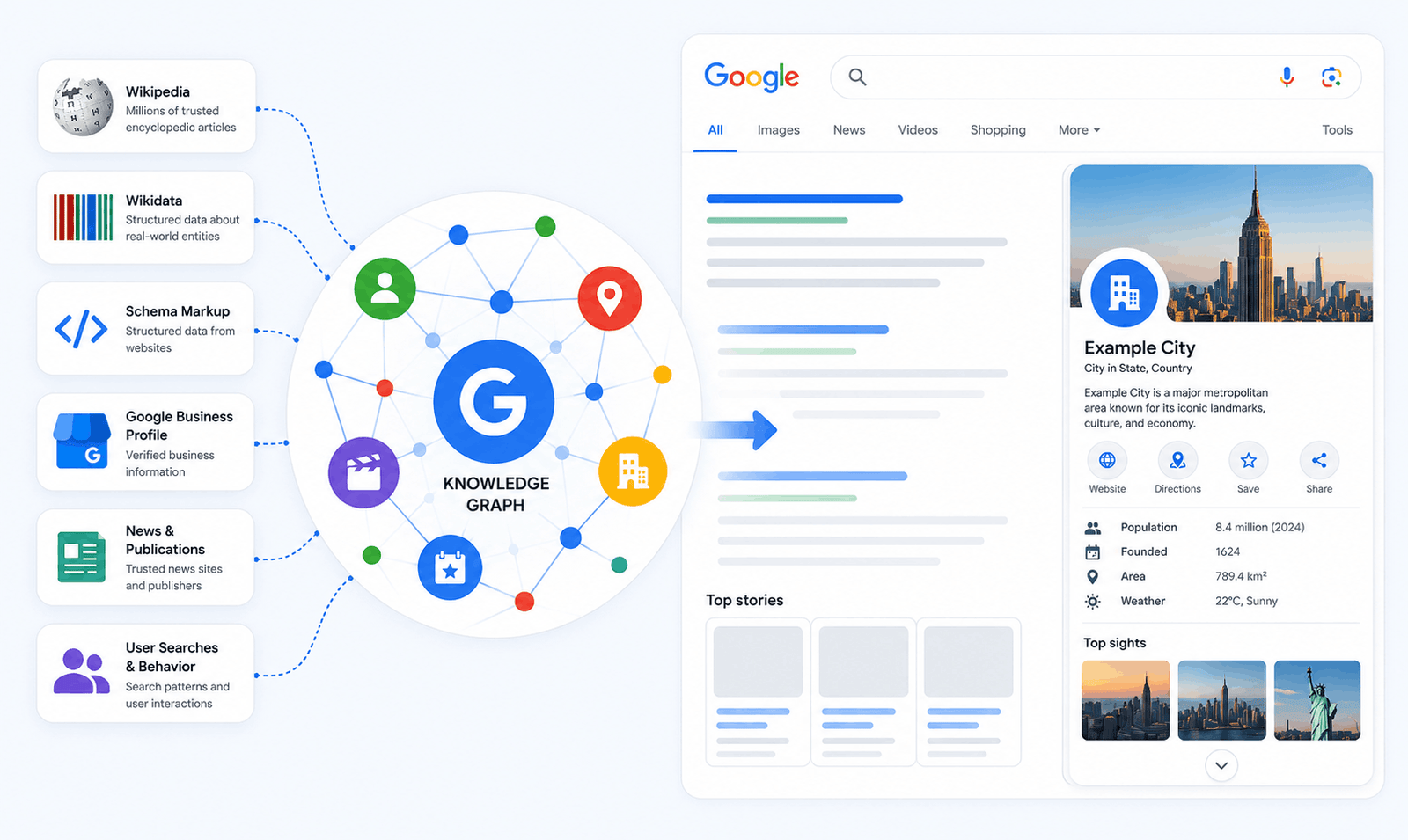
Have you ever Googled a brand name, a celebrity, or a landmark — and instantly seen a neat information box appear on the right side of the results page? No clicking. No scrolling. Just the answer, right there.
That is the Google Knowledge Graph doing its job.
For businesses and SEO professionals in 2026, understanding the Knowledge Graph isn’t optional — it’s essential. It directly impacts your brand’s visibility, authority, and how Google’s AI systems (including AI Overviews and Gemini) understand and present your business.
In this complete guide, the SEO team at cleverclicks breaks down everything you need to know: what the Knowledge Graph is, how it works, how it differs from the Knowledge Panel, and — most importantly — how to optimize for it and get your brand featured.
. What Is the Google Knowledge Graph?
The Google Knowledge Graph is a massive, interconnected database of facts that Google uses to understand the real world — people, places, organizations, events, and concepts — and how they all relate to each other.
Instead of treating a search query as just a string of words to match against web pages, the Knowledge Graph allows Google to recognize entities. An entity is any real-world “thing” — a person, a city, a company, a movie, a historical event — that can be uniquely identified and described.
Think of it as Google’s giant, constantly updated brain. When you search for “Virat Kohli,” Google doesn’t just find pages with his name. It knows he is a cricketer (entity type: Person), he plays for India (entity: Cricket Team), he is married to Anushka Sharma (entity: Person), and he has won numerous awards. The graph connects all these dots to give you an immediate, comprehensive snapshot.
In short: The Knowledge Graph helps Google move from understanding words to understanding meaning.
2. A Brief History: From Freebase to Today
To truly understand the Knowledge Graph, it helps to know where it came from.
2007 — Metaweb, a startup, launches Freebase, an open, collaborative database of structured real-world knowledge. Think of it as a Wikipedia that was built specifically for machines to read.
2010 — Google acquires Freebase and begins integrating its structured data into search.
May 2012 — Google officially launches the Knowledge Graph, famously described by then-SVP Amit Singhal with the phrase “things, not strings.” At launch, it contained over 500 million objects and 3.5 billion facts.
2016 — The Knowledge Graph grows to cover 70 billion facts and handles roughly one-third of all Google searches.
2020 — Google reports the Knowledge Graph now holds 500 billion facts about 5 billion entities.
2024–2026 — The Knowledge Graph becomes the backbone of Google’s AI-powered features — AI Overviews, Gemini, and Search Generative Experience (SGE) — all draw from it to generate intelligent, contextual answers.
The trajectory is clear: the Knowledge Graph has gone from a search feature to the fundamental infrastructure of how Google understands the world.
3. How Does the Google Knowledge Graph Work?
The Knowledge Graph works by organizing information as a graph structure — a network of interconnected nodes and edges.
- Nodes = Entities (e.g., “Shah Rukh Khan”, “Mumbai”, “Bollywood”)
- Edges = Relationships between entities (e.g., “Shah Rukh Khan” → born in → “New Delhi”)
Google populates this graph from a wide variety of trusted sources, including:
- Wikipedia and Wikidata
- Licensed databases and curated directories
- Structured data (Schema Markup) on websites
- Google Business Profiles
- Authoritative web sources such as major news outlets and government websites
- User search patterns — what people commonly search for and click on
Importantly, Google doesn’t just copy this data — it infers connections. If thousands of searches connect two entities, Google learns that relationship even without being explicitly told.
4. Knowledge Graph vs. Knowledge Panel — What’s the Difference?
This is one of the most common points of confusion, even among experienced marketers. Here’s the simple distinction:
| Knowledge Graph | Knowledge Panel | |
|---|---|---|
| What it is | The backend database of entities and facts | The visual box displayed in search results |
| Where it lives | Inside Google’s servers | On the Google SERP (right side on desktop, top on mobile) |
| Who sees it | No one — it’s infrastructure | Every searcher |
| Analogy | A library’s catalog system | A book displayed on the shelf |
The Knowledge Panel is the front-end display of what’s inside the Knowledge Graph.
If your brand has an entry in the Knowledge Graph, it will likely have a Knowledge Panel when someone searches your brand name. But the panel is just the visible tip of the iceberg — the real power lies in the graph itself.
At cleverclicks, we always help clients build their Knowledge Graph presence first, because the panel naturally follows once the entity is properly established.
5. The Role of the Knowledge Graph in Modern Search (2026)
In 2026, the Knowledge Graph’s influence on search has expanded dramatically. Here’s where it shows up:
1 AI Overviews & Gemini Answers
Google’s AI-generated answers at the top of search results pull directly from the Knowledge Graph. If your brand, product, or topic is well-represented in the graph, Google’s AI is far more likely to surface accurate information about you in AI Overviews.
2 Knowledge Panels
The most visible output — the information box on the right side of desktop results (or at the top on mobile) that shows key facts about an entity.
3 Rich Snippets and Featured Snippets
The graph helps Google determine which content best answers a query, boosting eligible pages into position zero.
5.4 People Also Search For (PASF)
The related searches you see after viewing a result are driven by the graph’s understanding of how entities relate to each other.
5 Voice Search (Google Assistant)
When you ask Google Assistant a direct question, it draws from the Knowledge Graph to speak the answer back to you. Brands with strong Knowledge Graph presence are far more likely to be surfaced in voice results.
6 Autocomplete Suggestions
As you type in the search bar, Google suggests completions based on entity relationships stored in the graph.
6. Why the Knowledge Graph Matters for Your Business
Getting your brand into the Knowledge Graph isn’t just a vanity metric. Here are the concrete business benefits:
Massive Visual Real Estate
A Knowledge Panel dominates the right column on desktop and takes up the entire first screen on mobile. This is free, prominent advertising that competitors can’t bid for.
Instant Brand Authority
When Google gives your business its own panel, it acts as an implicit verification. Customers perceive Knowledge Panel brands as more trustworthy, established, and credible.
Better AI Visibility
In the age of AI Overviews, if Google’s AI doesn’t “know” your brand as an entity, it cannot recommend or mention you intelligently. Knowledge Graph presence = AI visibility.
Protection Against Misinformation
Once you have a Knowledge Panel, you can claim it and correct inaccurate information — protecting your brand reputation proactively.
Higher Intent Traffic
Users who see your Knowledge Panel and still click through to your website are highly qualified. They’ve already validated your brand through the panel and are arriving with genuine intent.
7. How to Get Your Business Into the Knowledge Graph
This is where most SEO guides fall short. There’s no form to fill out, no button to click. You have to build entity authority so Google’s systems naturally include you. Here’s how:
Step 1: Implement Schema Markup (Structured Data)
Schema Markup is code you add to your website to tell Google exactly what kind of entity you are. For businesses, the most important schema types are:
Organization— defines your business name, logo, URL, social profiles, contact infoLocalBusiness— adds physical location, hours, service area (critical for local SEO)Person— for founders, executives, authors building personal brandsWebSite— enables the Sitelinks search box in your Knowledge Panel
Pro tip from cleverclicks: Always use JSON-LD format for schema (Google’s preferred method). Add it to every key page of your website, not just the homepage.
Example Organization Schema (JSON-LD):
json
{
  "@context": "https://schema.org",
  "@type": "Organization",
  "name": "CleverClicks",
  "url": "https://cleverclicks.in",
  "logo": "https://cleverclicks.in/logo.png",
  "sameAs": [
    "https://www.linkedin.com/company/cleverclicks",
    "https://twitter.com/cleverclicks",
    "https://www.facebook.com/cleverclicks"
  ]
}
The sameAs property is especially powerful — it links your website to your profiles across the web, helping Google connect all your brand touchpoints into a single, coherent entity.
Step 2: Optimize Your Google Business Profile
For local businesses, your Google Business Profile (GBP) is the single fastest path to a Knowledge Panel. Ensure your GBP is:
- 100% complete — every field filled in
- Consistent NAP (Name, Address, Phone) — exactly matching your website and all directories
- Rich with high-quality photos
- Actively collecting and responding to reviews
- Updated with current hours, services, and posts
A fully optimized GBP tells Google you are a real, active, verified local entity.
Step 3: Build Authority on External Platforms
Google sources Knowledge Graph data from trusted third-party databases. Prioritize getting listed on:
- Wikidata — The most direct path to the Knowledge Graph. Create or claim a Wikidata entry for your brand with accurate, sourced information.
- Wikipedia — If your brand meets Wikipedia’s notability guidelines, a Wikipedia article dramatically accelerates Knowledge Graph inclusion. (Note: Wikipedia has strict editorial rules — focus on genuine notability, not promotional content.)
- Crunchbase — Essential for startups and B2B companies.
- LinkedIn Company Page — Google regularly pulls company data from LinkedIn.
- Industry directories and associations relevant to your niche.
- Press coverage in authoritative news outlets (Economic Times, YourStory, Livemint for Indian brands).
Step 4: Maintain Absolute Consistency Across the Web (NAP + Entity Consistency)
Google cross-references your brand information across dozens of sources. Any inconsistency confuses the algorithm and weakens your entity signals.
Your brand name, address, phone number, founding year, and description should be letter-perfect identical everywhere:
- Your website
- Google Business Profile
- Social media profiles (LinkedIn, Twitter/X, Instagram, Facebook)
- Directories (JustDial, IndiaMART, Sulekha for Indian businesses)
- Press mentions
- Wikidata / Wikipedia
Even small differences — “Pvt. Ltd.” vs “Private Limited” — create entity confusion for Google.
Step 5: Claim Your Knowledge Panel
Once Google has created a panel for your brand, you can claim it:
- Search your brand name on Google
- Scroll to the bottom of the Knowledge Panel
- Click “Claim this knowledge panel”
- Verify your identity as an authorized representative
- Use the “Suggest an edit” feature to correct inaccuracies, update your logo, or add social profile links
Claiming your panel gives you a direct line to manage how your brand appears in search.
8. Entity SEO: The Concept You Can’t Ignore in 2026
Traditional SEO was about keywords. Modern SEO — especially in the era of AI Search — is increasingly about entities.
Entity SEO is the practice of making your brand, your people, and your content clearly identifiable as distinct, authoritative entities in Google’s Knowledge Graph.
The goal is to answer three questions Google has about every entity:
- What is this entity? (Type: Organization, Person, Product, etc.)
- What do we know about it? (Attributes: location, founding year, services, etc.)
- How does it relate to other entities? (Connections: industry, people, places, topics)
The stronger your entity signals, the better Google understands you — and the more likely your brand appears in AI Overviews, voice search, and Knowledge Panels.
At cleverclicks, Entity SEO is a core part of every SEO strategy we build for clients. In 2026, if Google doesn’t understand your brand as an entity, you’re invisible to a growing share of AI-powered search features.
9. Common Mistakes to Avoid
Inconsistent Brand Information
The #1 killer of Knowledge Graph inclusion. Audit all your online mentions and standardize everything.
Missing or Incorrect Schema Markup
Many websites have schema markup with errors — wrong entity types, missing sameAs links, or conflicting information. Use Google’s Rich Results Test to validate yours.
No Wikidata Presence
Most Indian brands skip Wikidata entirely. This is a missed opportunity since Wikidata is one of Google’s primary Knowledge Graph data sources.
Ignoring the Google Business Profile
An incomplete or unclaimed GBP is leaving Knowledge Panel real estate on the table, especially for local and service businesses.
Treating Knowledge Graph as a One-Time Task
The graph is dynamic. Keep your information updated as your business evolves — new locations, new services, leadership changes, etc.
Final Thoughts
The Google Knowledge Graph is no longer just a search feature — it is the foundational layer of how Google understands the internet, powers AI answers, and decides which brands deserve visibility.
In 2026, optimizing for the Knowledge Graph means thinking beyond keywords. It means building a clear, consistent, authoritative entity presence across the web — through Schema Markup, external profiles, content that establishes topical authority, and rigorous brand consistency.
The brands that invest in this now will have a significant advantage as AI-powered search continues to grow.